

DHL Express Shipping Tutorial – Step-by-Step Guide
In This Tutorial
- The Tutorial – Start
- Step 1: Sender & Receiver
- Step 2: Shipment Details
- Step 3: Add Your First Item
- Step 4: Item Description – Let AI Do The Work
- Step 5: Find The Correct Commodity Code
- Step 6: Select The Correct Unit
- Step 7: Customs Invoice Details
- Step 8: Package Size And Weight
- Step 9: Payment And Delivery Options
- Step 10: Review The Price And Delivery Time
- Step 11: Print Your Shipping Documents
- A Few Final Words
- FAQ – Frequently Asked Questions
DHL Express Shipping Tutorial
Creating an international DHL Express shipment isn’t difficult – but getting it right is essential. A small mistake in the shipping details or customs declaration can lead to delays, additional fees or, in the worst case, your parcel being returned.
In this tutorial, we’ll guide you through the entire shipment creation process using the official MyDHL+ shipping portal. We’ll explain every important field, show you which options to select, and share the practical tips we’ve learned after shipping parcels all over the world.
Unlike our Ultimate DHL Express Shipping Guide, this article focuses exclusively on creating a shipment for you as the sender and receiver. We’ll complete the process together step by step – from the first screen to printing your shipping documents.
Let’s get started.

Step 1: Sender & Receiver
Before creating your shipment, find a real DHL Service Point. Don’t trust Google Maps alone – many locations no longer exist. Call ahead or visit in person, note the contact person’s name and ask how long they’ll store your parcel.
Always enter your own name first as the receiver.
Example:
James Walker
c/o DHL Service Point
123 Example Street
4567 City
8910 Country
If you’re shipping to a private address, use the homeowner only as c/o. Not all address fields appear on the shipping label, so your name should always come first.
Passport
Some countries require the receiver’s passport type and passport number for customs clearance. If you’re shipping the parcel to yourself, simply enter your own passport details.
EORI Number
An EORI number may be required for some shipments to or from the EU. Most private individuals don’t need one, but if customs requests it, you can apply free of charge through your country’s customs authority.
We never used or needed one!
Private Use
Whenever possible, make it clear that the shipment is for private use only and will be exported again. Use phrases such as:
- Private Use
- Tourist
- No Resale
- Vehicle Repair
- Will Be Exported Again
This helps customs understand that you’re an overlander receiving your own belongings—not importing goods for commercial purposes.
Step 2: Shipment Details
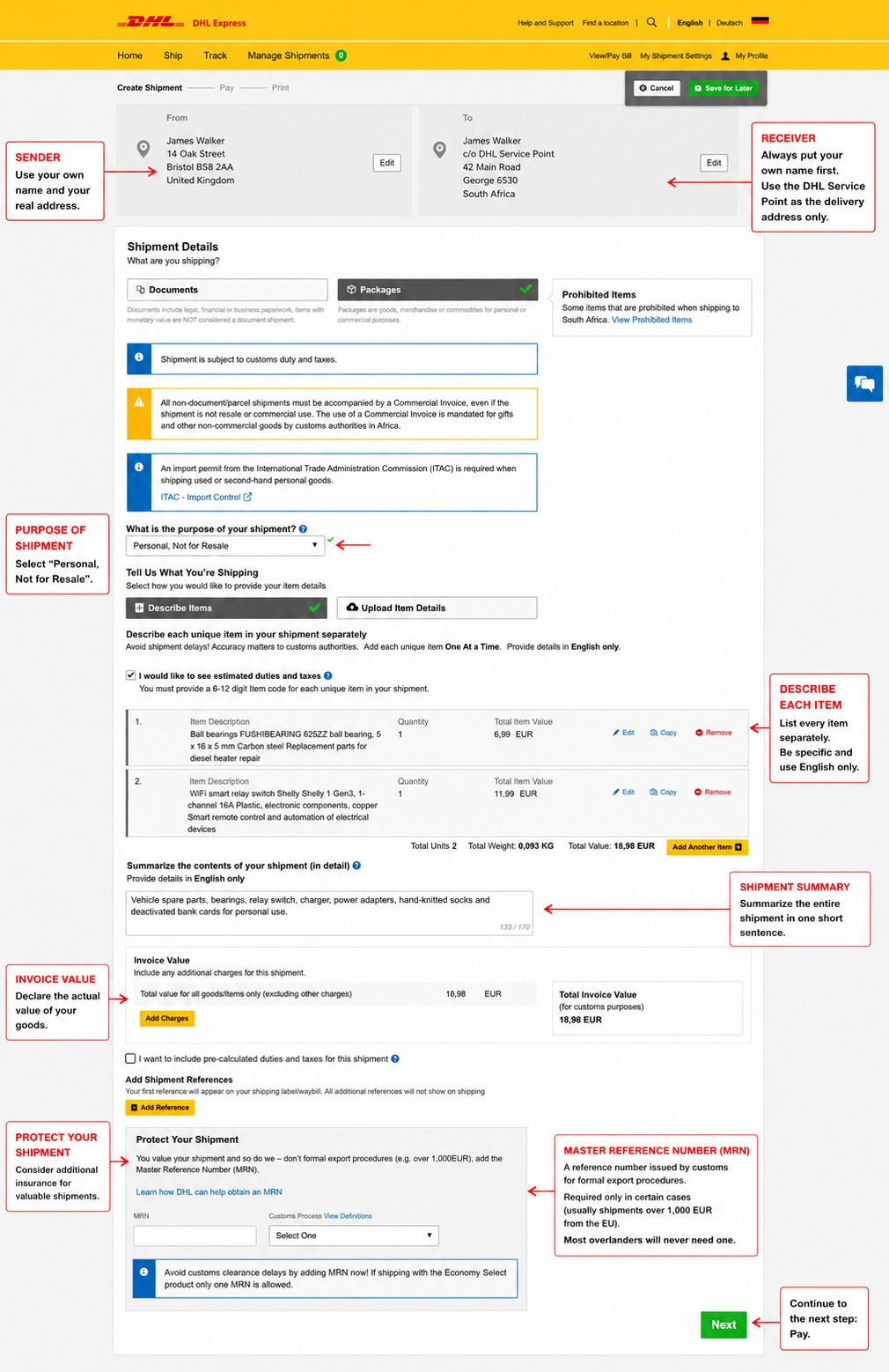
This page contains the most important information for customs clearance. A few fields deserve special attention.
Purpose of Shipment
Always choose Personal, Not for Resale whenever you’re shipping your own belongings or spare parts to yourself while traveling.
This makes it clear that the shipment is not intended for commercial purposes.
Describe Each Item
Every item must be declared individually.
Use short but precise English descriptions and avoid generic terms like parts, accessories or miscellaneous.
In the next step, we’ll show you exactly how to describe your items correctly.
Shipment Summary
Summarize the contents of your parcel in one short English sentence.
Invoice Value
In most cases, you don’t need to enter anything here.
The total invoice value is calculated automatically from the items you add to your shipment.
Master Reference Number (MRN)
Most overlanders can safely ignore this field.
An MRN (Master Reference Number) is only required for certain formal export procedures from the EU, typically for high-value commercial exports or shipments that require an export declaration.
If you need an MRN, you’ll already know it before creating your shipment.
Shipment Protection
For valuable shipments, consider adding Shipment Value Protection. While DHL includes limited liability, additional protection can be worthwhile when shipping expensive spare parts or equipment.
Step 3: Add Your First Item
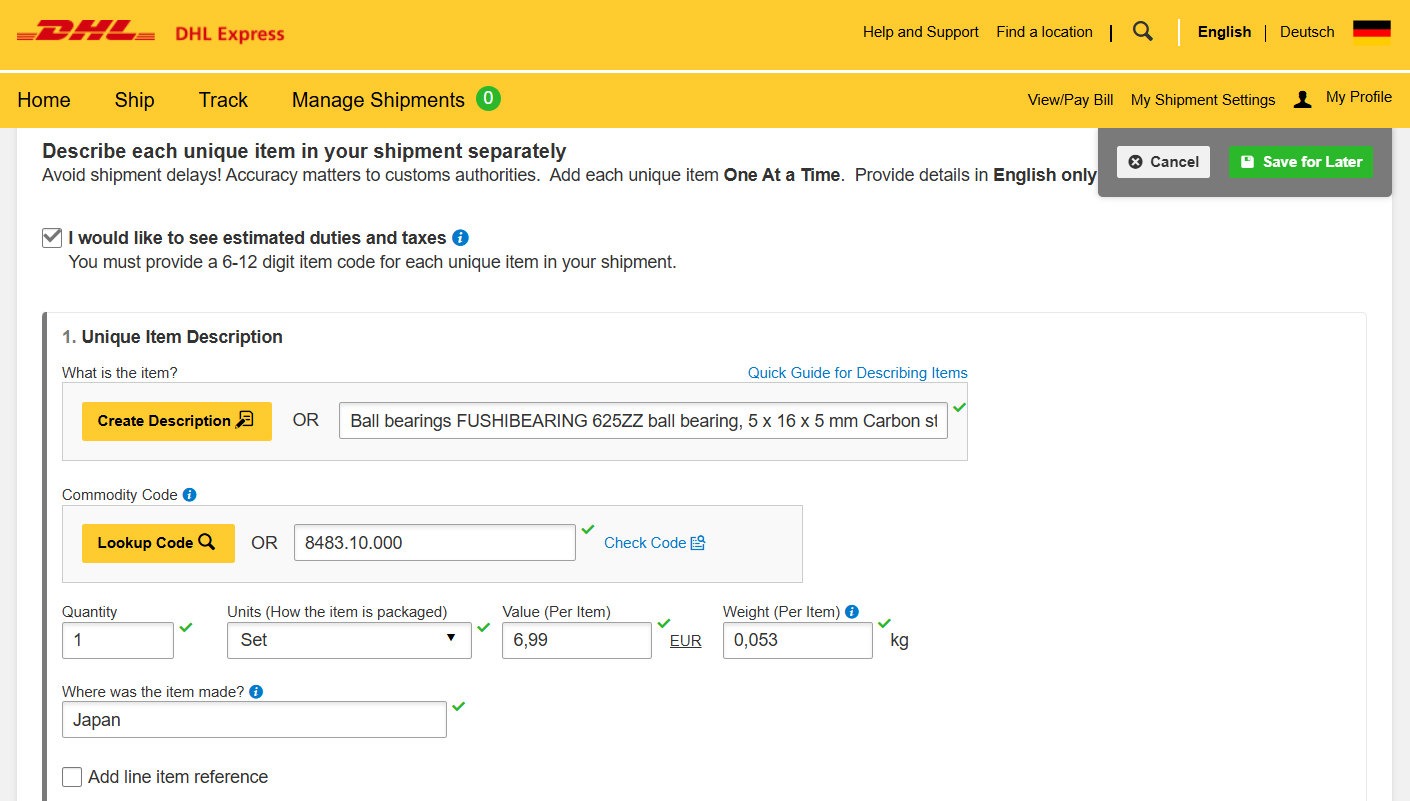
Click Add Another Item to create a new item entry.
The item section will expand, allowing you to enter all customs-relevant information for that product.
To make things easier, click Create Description.
DHL will then open the description generator shown in the next step. It helps you create a customs-friendly item description that is far more precise than generic terms such as car parts or accessories.
We highly recommend using this tool whenever possible, as accurate descriptions can significantly reduce customs questions and delays.
Step 4: Item Description – Let AI Do the Work
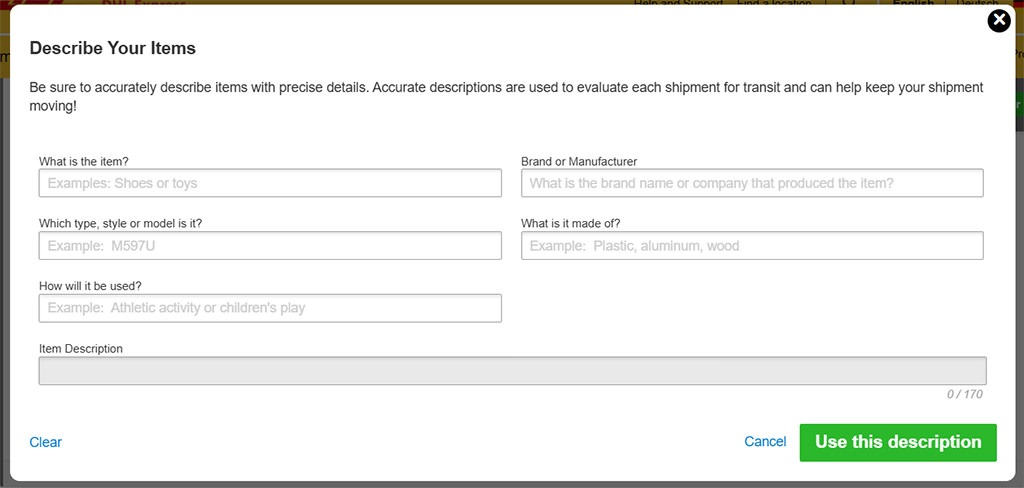
This is one of the most useful features in MyDHL+.
Instead of trying to come up with the perfect customs description yourself, take a screenshot of this window and upload it to your favorite AI together with a link to the product (or the product page).
Ask the AI to fill in every field based on the product specifications.
The more accurate the information, the better.
Once all fields are completed, MyDHL+ automatically generates the final Item Description in the last field.
We use this method for almost every shipment – it saves time, reduces mistakes and produces excellent customs descriptions.
Step 5: Find the Correct Commodity Code
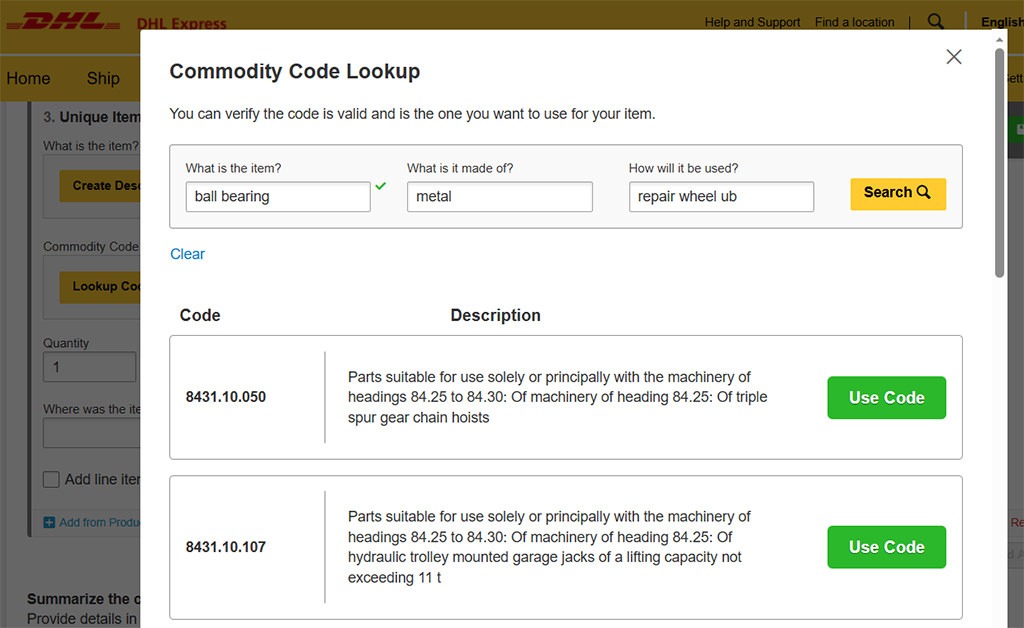
Every item shipped internationally requires an HS (Harmonized System) commodity code. Customs authorities use this code to identify your product and determine whether import restrictions, duties or taxes apply.
Fortunately, MyDHL+ makes this easy.
Simply enter:
- What is the item?
- What is it made of?
- How will it be used?
Click Search and MyDHL+ will suggest one or more matching commodity codes.
Choose the code that best matches your product.
Do NOT ask AI here. It always generates phantasy-codes 😉
Taking a few extra seconds here is worthwhile. A correct commodity code can help prevent customs delays and unnecessary questions later in the shipping process.
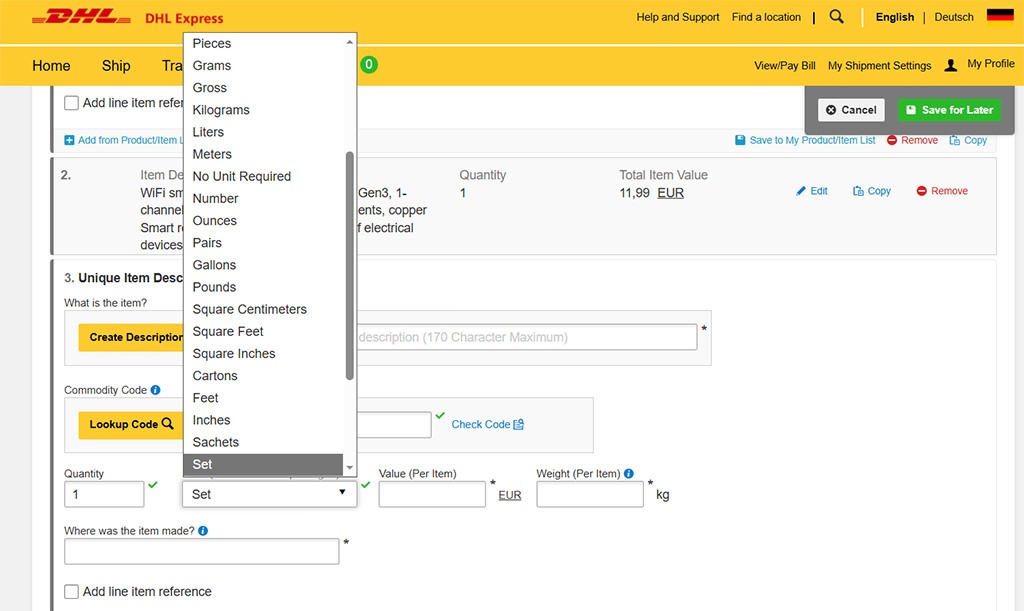
Step 6: Select the Correct Unit
After describing your item, you’ll need to choose how it is packaged or counted.
For most overlanders, the most common options are:
- Set – for items sold or shipped together as one complete set (e.g. brake pads, bearing kits, repair kits).
- Pieces – for individual items such as a relay, alternator, water pump or sensor.
Only use units such as Kilograms, Liters, Pairs or Cartons if they genuinely describe the item you’re shipping.
Choose the unit that best matches the product. It helps customs understand exactly what they’re looking at and avoids unnecessary questions.
Value
Enter the actual value of one single item, not what you originally paid years ago or what you hope it’s worth.
If possible, use the value shown on the invoice or receipt. Customs uses this information to calculate duties and taxes.
Weight
Enter the weight of one single item as accurately as possible.
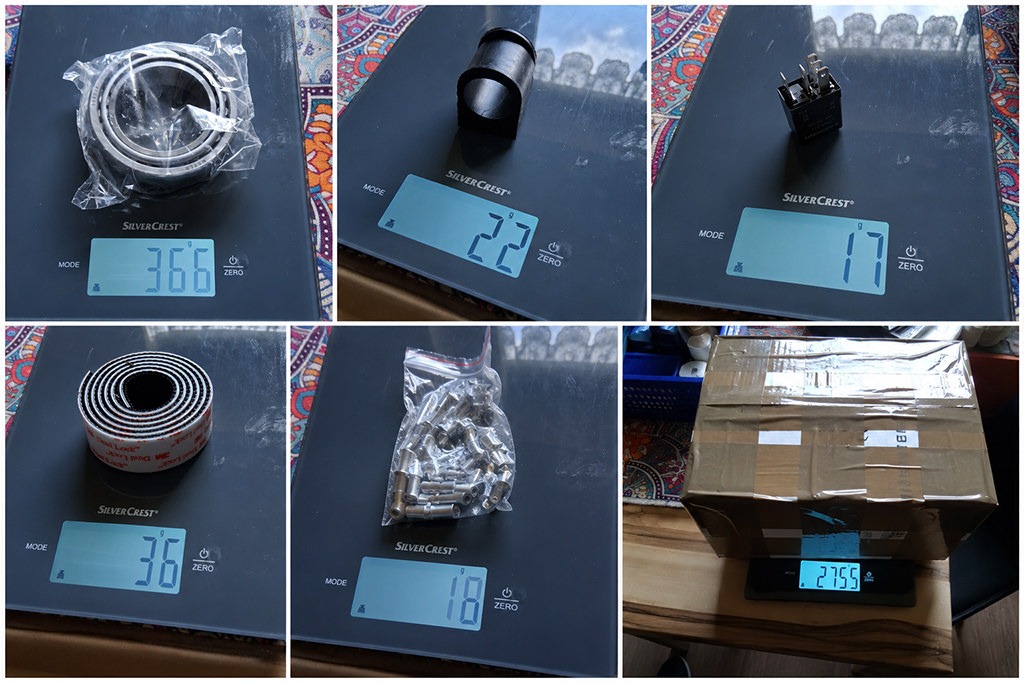
We recommend weighing every item individually on a digital kitchen scale before packing. This not only improves customs declarations but also helps if you ever need to file an insurance claim.
Small inaccuracies usually aren’t a problem, but avoid guessing whenever possible.
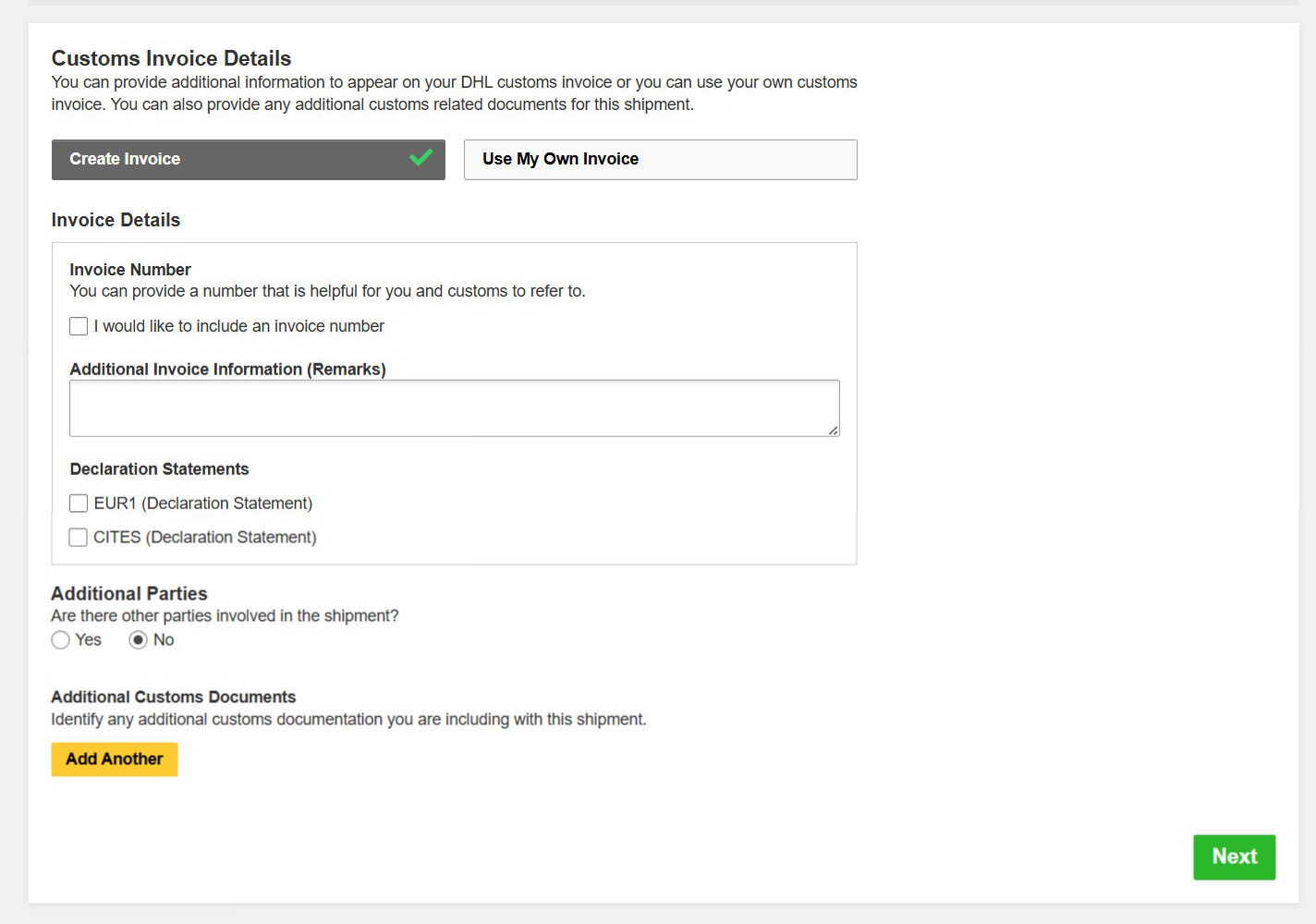
Step 7: Customs Invoice Details
This page lets you add additional information for customs.
Create Invoice
Select Create Invoice. MyDHL+ will automatically generate the Commercial or Proforma Invoice using the information you’ve entered in the previous steps.
Additional Invoice Information (Remarks)
This is one of the few places where you can communicate directly with customs.
We recommend adding a short remark such as:
Private use only. No resale. Tourist. Vehicle repair. Will be exported again.
Keep it short, factual and in English.
Declaration Statements
Most overlanders can safely ignore these options. They are only required for specific products or legal declarations.
Additional Parties
If you’re shipping a parcel to yourself, simply select No.
Additional Customs Documents
If DHL or customs has requested supporting documents – such as invoices, proof of purchase or other paperwork – you can attach them here.
For most private shipments, this section can remain empty.
Regardless of what you upload here, we always print every invoice and include two complete sets with the shipment: one set in a transparent document pouch attached to the outside of the parcel and another set inside the box.
We also include a separate printed note reading:
These items are for private use only, are not intended for resale and will be exported again when leaving the country as a tourist.
It takes only a few minutes but can save days – or even weeks- of unnecessary customs delays (and costs).
Once you’ve reviewed everything, click Next to continue.
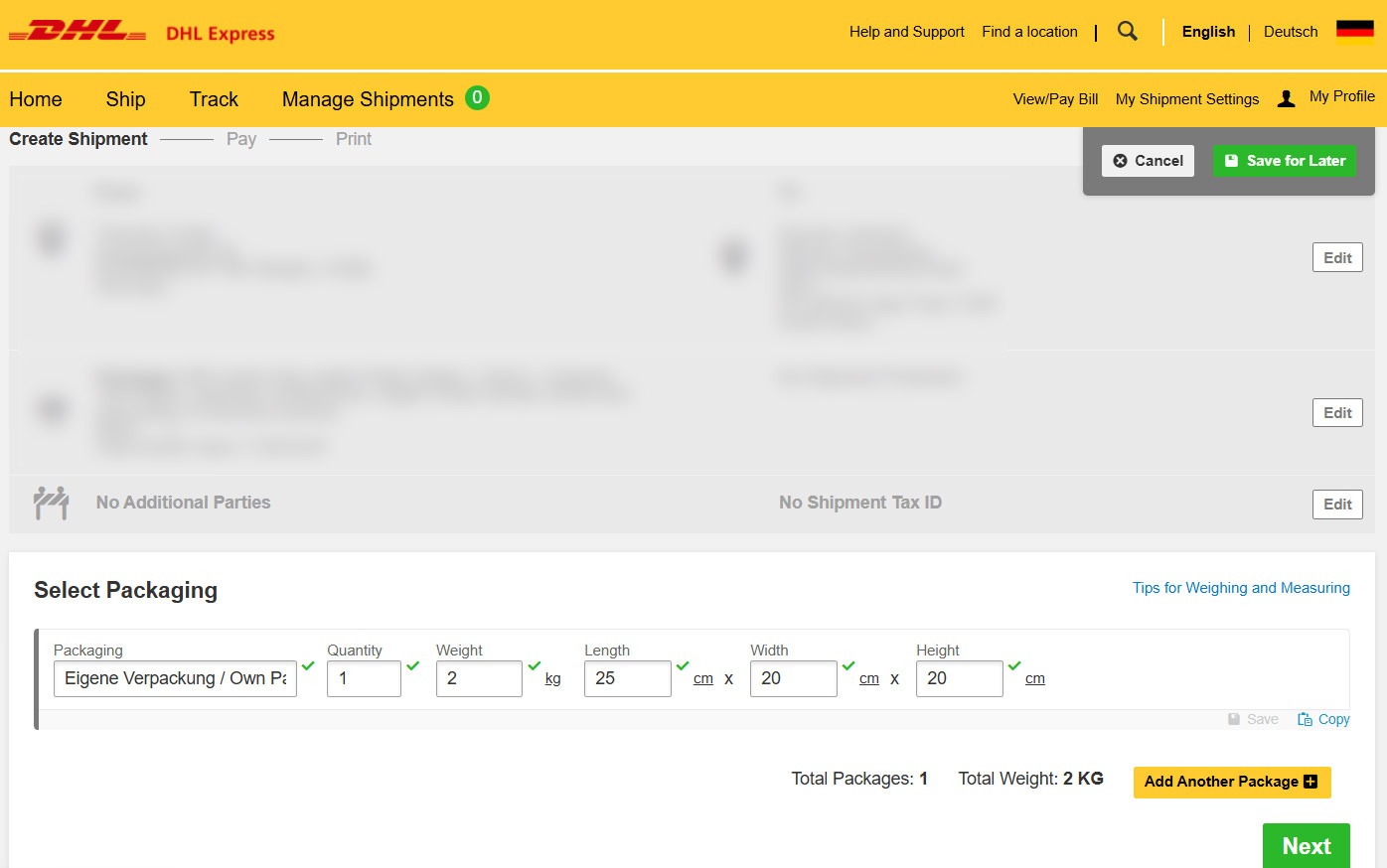
Step 8: Package Size and Weight
This is where you enter your parcel’s weight and dimensions.
Here’s a trick we’ve learned after many international shipments.
Play around with the package dimensions and weight before booking. Increase the dimensions in 5 cm increments and the weight in 500 g increments, then check the shipping price each time.
DHL uses pricing thresholds. As soon as you cross one of them, the shipping cost can increase dramatically. Sometimes just one extra centimeter can add €50 or more to the total price.
Every shipment has a sweet spot. Finding it takes a few minutes and can be a little frustrating, but it can easily save you a significant amount of money.
One more tip: plan ahead before ordering your spare parts. Keep a list of every item’s weight and approximate dimensions while shopping. Otherwise, you may discover too late that everything no longer fits within your target parcel size or weight – and suddenly your shipping costs jump into the next price bracket.
(For most of the countries we’ve shipped to, the first sweet spot was a parcel measuring 25 × 20 × 20 cm. A 2 kg shipment typically cost between €114 and €148, depending on the destination country and its zone. Exceeding one of these dimensions often increased the shipping price by around €50.)
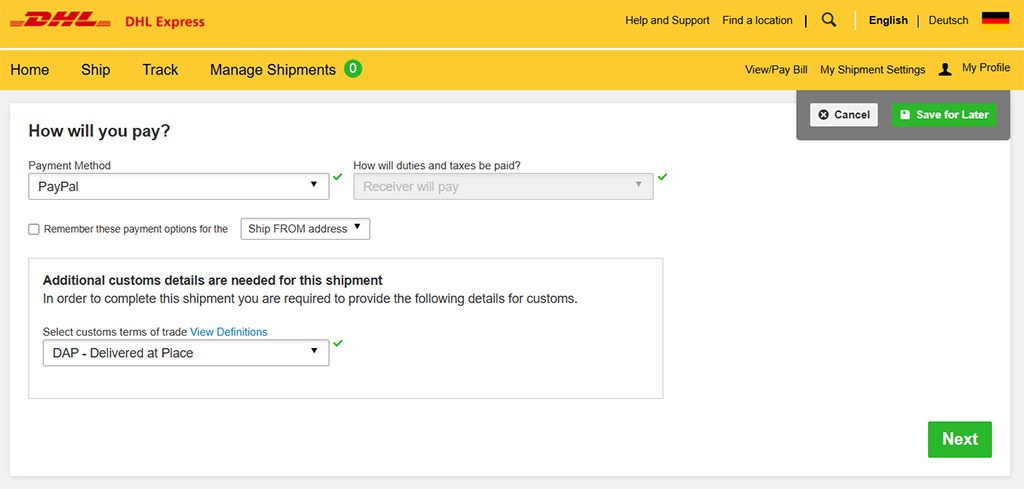
Step 9: Payment and Delivery Options
This is the second-to-last step before creating your shipment.
Choose your preferred payment method. We usually pay with PayPal, but any available payment option will work.
Duties and Taxes
If you’re shipping a parcel to yourself, we recommend selecting Receiver will pay. Customs duties and import taxes, if applicable, are usually collected when the parcel arrives in the destination country.
Incoterms
For most overlanders, DAP (Delivered at Place) is the right choice.
With DAP, DHL delivers the shipment to the destination, while the receiver is responsible for any import duties, taxes or customs fees that may arise.
Once everything is set up, click Next.
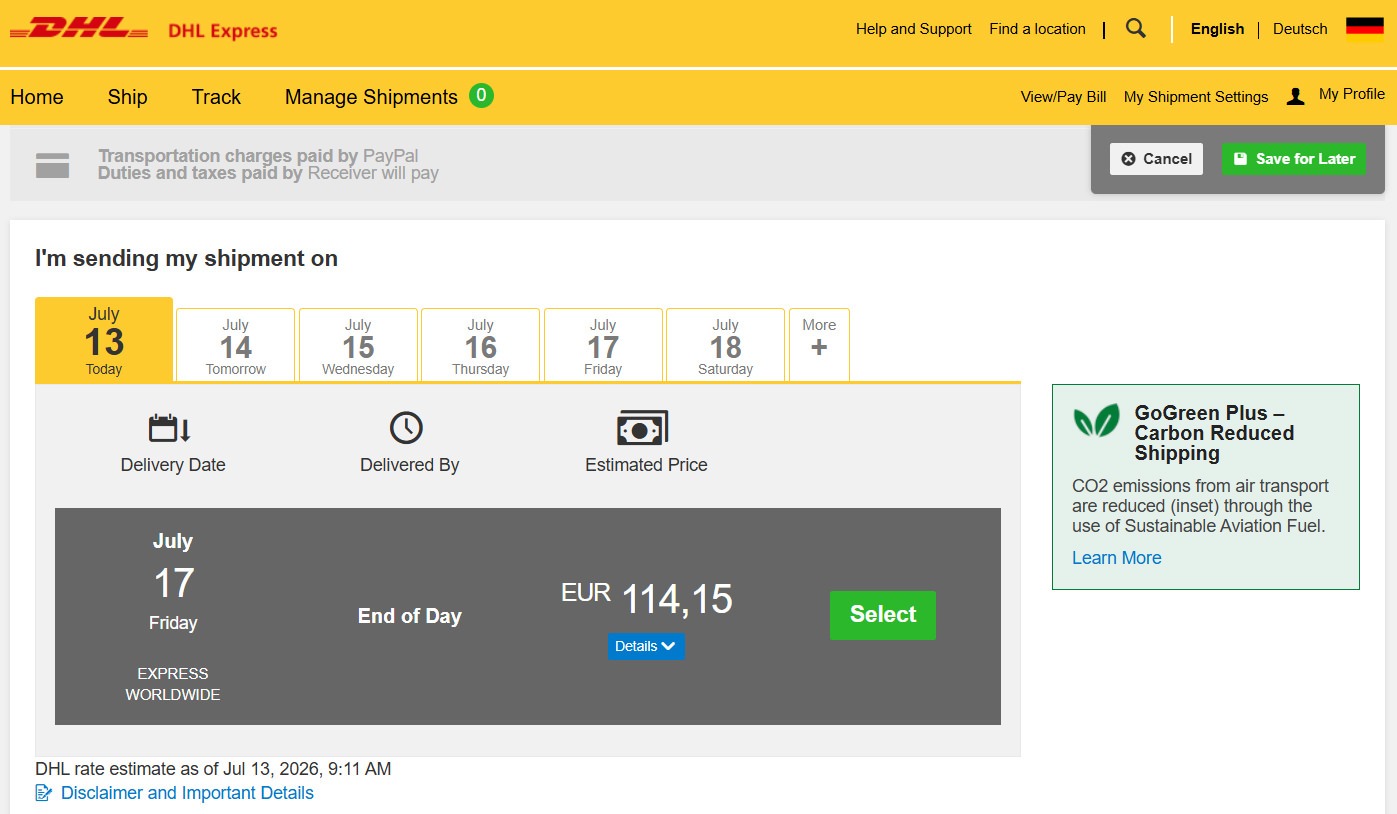
On the following page, MyDHL+ calculates the available DHL Express services, estimated delivery times and the final shipping price. At this point, you can still go back and adjust your parcel size or weight if you want to optimize the shipping costs before completing your booking.
Step 10: Review the Price and Delivery Time
You’re almost done.
Based on all the information you’ve entered, MyDHL+ now calculates the available shipping service, estimated delivery date, transit time and final shipping price.
This is your last opportunity to review everything before purchasing the shipment.
If the price is higher than expected, you can still go back and adjust your parcel dimensions or weight. As we mentioned earlier, even 1 cm or a few hundred grams can move your shipment into a different pricing tier and save you a considerable amount of money.
Once you’re happy with the delivery time and price, click Select to complete your booking.
Your shipping documents – including the Waybill, Custom-, Commercial or Proforma Invoice, Transport Label and Shipment Receipt – will then be generated automatically and are ready to print.
Step 11: Print Your Shipping Documents
Once you’ve completed your booking, MyDHL+ generates several PDF documents.
Waybill
Print the Waybill and attach it securely to the outside of your parcel. This is the main shipping label DHL uses to identify and transport your shipment.
Commercial or Proforma Invoice
Print at least two copies.
Place one set in a transparent document pouch on the outside of the parcel and another set inside the box. Customs officials may need these documents at any point during transit.
Customs Invoice
If a separate Customs Invoice has been generated, print it as well and include it with the other customs documents.
Transport Label
Attach the Transport Label to the outside of the parcel next to the Waybill. Make sure all barcodes remain flat, clean and fully visible.
Shipment Receipt
Keep the Shipment Receipt for your records. It contains your shipment details and tracking information and may be useful if you need to contact DHL support later.
One Last Recommendation
Before sealing the parcel, take photos of every item, the printed documents, and the finished package from all sides. These photos can be invaluable if your shipment is delayed, damaged or an insurance claim becomes necessary.

A Few Final Words
If you’ve made it this far, thank you for taking the time to read our guide.
Everything you’ve read is based on our own experience after shipping countless parcels across the planet. We’ve made expensive mistakes, spent weeks chasing lost shipments, argued with customs officials and learned many lessons the hard way. Hopefully, this guide helps you avoid at least some of them.
Shipping internationally can seem overwhelming at first, but once you’ve done it a few times – and with a little preparation – it becomes surprisingly manageable.
If this guide has helped you, we’d really appreciate it if you shared it with other overlanders or travelers who might find it useful. It helps us keep creating free, in-depth travel content for the community.
We wish you safe travels, unforgettable adventures, and – most importantly – that every parcel you send arrives exactly where and when you need it.
See you somewhere on the road!
Totti & Fenny
Travelcandies-On-Tour
FAQ – Frequently Asked Questions
What Should I Keep in Mind?
Creating a DHL Express shipment is actually quite straightforward. The real challenge is preparing it properly.
Before you click Submit, ask yourself a few simple questions:
- Is the recipient address correct and actually reachable?
- Have you described every item accurately and in English?
- Are the declared values realistic?
- Have you chosen the correct HS (Commodity) Codes?
- Have you measured and weighed everything accurately?
- Have you found the most cost-effective parcel size?
- Have you printed all required documents?
- Did you include invoices inside and outside the parcel?
- Have you made it clear that the shipment is for private use and not for resale?
- Have you photographed every item and the finished parcel?
Two final pieces of advice have saved us both time and money:
Keep the number of different items as low as possible. Every additional item on the customs invoice increases complexity. If the invoice ever has to be corrected or recreated, DHL may charge a service fee. We learned this the hard way—one correction cost us €78. As a rule of thumb:
As few items as possible, as many as necessary.
Also, don’t use valuable shipping space for unimportant things. Socks, snacks, souvenirs and other inexpensive items rarely justify expensive DHL Express shipping. Reserve the space for what really matters—essential spare parts, important documents or equipment that keeps your journey moving.
Can I use AI to create customs descriptions?
Absolutely. In fact, we highly recommend it.
AI can help you write accurate item descriptions, suggest suitable HS (Commodity) Codes (but take care, often enough they’re not working), summarize your shipment and even review your customs documents for mistakes or inconsistencies.
Our preferred method is simple: upload a screenshot of the DHL form together with a link to the product and ask the AI to complete the fields. It saves time and usually produces much better customs descriptions than writing them yourself.
Just remember: AI is a tool—not a customs officer. Always review the generated information before submitting your shipment. You’re ultimately responsible for everything you declare.
Can I save my shipment and finish it later?
Yes.
MyDHL+ allows you to save an unfinished shipment and continue working on it later. This is especially useful if you’re still waiting for invoices, exact weights or package dimensions
What happens if I use the wrong HS code?
In many cases, nothing will happen – but sometimes it can cause significant problems.
An incorrect HS (Commodity) Code may lead to customs delays, additional questions, incorrect import duties or taxes, or even a request to submit corrected paperwork before your shipment can continue.
Don’t worry if you’re not an expert. Even customs authorities sometimes classify products differently. The important thing is to choose the most accurate code possible based on the item’s material and intended use.
Do I have to declare every item separately?
Yes. Every different item should be declared separately with its own description, value, weight and HS (Commodity) Code.
However, that doesn’t mean you should create dozens of individual entries.
If you’re shipping multiple identical items, you can simply increase the quantity instead of creating a new entry for each one.
We also recommend keeping the number of different items as low as possible. Every additional item makes the customs invoice more complex and increases the likelihood of questions, corrections or delays.
Our rule is simple:
As few different items as possible, as many as necessary.
What value should I declare for used items?
Always declare the actual current market value of the item – not the price you originally paid when it was new.
Customs wants to know what the item is reasonably worth today. Declaring an unrealistically low value can raise suspicion, while declaring a value that’s too high may result in unnecessarily high import duties and taxes.
If you’re unsure, use a realistic second-hand value based on comparable items or current market prices.
Whatever value you declare, make sure you can justify it if customs asks for proof.
Can I reuse an old DHL Express box?
Sure, why not? As long as the box is clean, sturdy and in good condition.
Remove or completely cover all old shipping labels, barcodes and tracking numbers to prevent scanning errors during transport.
If the box is damaged, crushed or has lost its structural strength, use a new one instead. Remember, your shipment is only as safe as its packaging.
For valuable shipments, we recommend using a strong double-walled cardboard box and plenty of protective packing material. A well-packed parcel is far less likely to be damaged—and may also help if you ever need to make an insurance claim.
How should I pack fragile spare parts?
Pack them as if the parcel will be dropped, thrown and stacked under heavy boxes—because it probably will.
From what we’ve been told by DHL in the past, your parcel should be strong enough to survive a fall from approximately 70 cm (28 inches) without the contents being damaged.
Wrap every fragile item individually using bubble wrap or other protective material and make sure nothing can move inside the box. Fill all empty spaces with cushioning material to prevent the contents from shifting during transport.
Heavy parts should be placed at the bottom of the parcel, while lighter and more fragile items should go on top.
If you’re shipping used spare parts, make sure they’re clean and free of oil or grease, as some countries have restrictions on contaminated automotive parts.
Finally, seal the box with strong packing tape, reinforce the edges and photograph both the contents and the finished parcel before shipping. It only takes a few minutes and can be invaluable if you ever need to make an insurance claim.
Can I cancel a shipment after paying?
I have to admit that I don’t know the answer to this one, so I’ll let AI take over.
Yes, in most cases you can cancel a DHL Express shipment after payment, provided it hasn’t been collected or entered the DHL network yet.
If the shipment has not yet been picked up, you can usually cancel it through your MyDHL+ account or by contacting DHL Express customer service. Whether you’re entitled to a full refund depends on your country and the stage of the shipment.
Once DHL has collected the parcel or it has already been processed, cancellation is generally no longer possible.
If you’re unsure, contact DHL Express as soon as possible. The earlier you act, the greater the chance that your shipment can still be cancelled or modified.
What Happens If My Parcel Is Lost, Damaged, or Items Are Missing?
First of all: don’t panic.
Take photos of the parcel before opening it, especially if it appears damaged. Then photograph the contents and compare them with the photos you took before shipping.
If items are missing or damaged, contact DHL Express immediately and report the problem. The sooner you do so, the better.
This is exactly why we recommend:
- photographing every item before packing,
- photographing the finished parcel from all sides,
- keeping all invoices,
- saving all shipping documents and tracking information.
Without evidence, it’s much more difficult to prove what was actually inside the parcel and in what condition it was shipped.
If you purchased Shipment Value Protection, the claims process is generally much easier. However, even then, good documentation is your strongest evidence.
In our experience, preparation doesn’t stop when you close the box—it continues until the parcel has safely reached its destination.
Can I Change the Delivery Address After Shipping?
Again, this is a question I can’t answer from personal experience, so I’ll let AI take over.
Yes – but only under certain circumstances.
If your shipment hasn’t been delivered yet, DHL Express may be able to change the delivery address. Whether this is possible depends on the destination country, the shipment’s current status and local customs regulations.
In many cases, you’ll need to contact DHL Express Customer Service directly. Address changes are usually easier to arrange before the shipment reaches the destination country or before it has entered customs clearance.
Keep in mind that changing the delivery address may result in additional charges or a delay in delivery, especially if the new address is in a different city or service area.
If you need to make a change, contact DHL Express as soon as possible. The earlier you request it, the better the chances that the shipment can still be redirected.
Have You Ever Had to File an Insurance Claim?
Yes.
One of our parcels went missing, so we opened a claim with DHL Express. Fortunately, we had documented everything thoroughly with photos taken before shipping and were also able to provide witness statements.
The claims process took a few weeks, but in the end, we were fully reimbursed for the value of the shipment.
That experience reinforced one of the most important lessons we’ve learned: always document your shipment. A few photos and well-organized paperwork can make all the difference if something goes wrong.
How can I reduce DHL Express shipping costs?
There are several ways to reduce your shipping costs without compromising reliability.
- Keep your parcel as small as possible. Even an increase of 1 cm can move your shipment into a higher pricing tier.
- Play around with the dimensions and weight. Increase the size in 5 cm increments and the weight in 500 g increments to find the pricing sweet spot.
- Ship only what’s really important. Don’t waste expensive shipping space on socks, snacks or other inexpensive items.
- Keep the number of different items low. Fewer items mean simpler customs paperwork and can even save money if documents ever need to be corrected.
- Plan ahead. Record the weight and dimensions of every item before ordering so you can build the most cost-effective parcel.
- Use the space you’ve already paid for. If you’re still below the next pricing threshold, fill the remaining space with additional important items or extra protective packaging.
Our biggest tip?
Spend an extra 15 minutes optimizing your shipment before booking. We’ve saved well over €50 on a single shipment simply by reducing one parcel dimension by a few centimeters.
What if my parcel is delayed in customs?
First of all, don’t panic. Customs delays are quite common and don’t necessarily mean there’s a problem with your shipment.
Start by checking the tracking status carefully. If the parcel remains in customs for several days, contact DHL Express. In many cases, customs is simply waiting for an additional document or a piece of information.
Unfortunately, the tracking information often doesn’t tell you exactly what’s missing. From our experience, you’ll usually only find out by speaking to a real DHL support agent.
If everything has been declared correctly, there’s often nothing you can do except wait. In some countries—especially where bureaucracy is extensive—customs clearance can take days or even weeks, regardless of how well your shipment was prepared.
Our advice is simple: stay proactive. Call DHL, respond quickly to any requests and keep all your invoices and shipping documents close at hand. The faster you provide any missing information, the sooner your parcel can continue its journey.
What is volumetric weight?
Volumetric weight is the amount of space your parcel occupies, not how much it actually weighs.
For air freight, DHL Express charges whichever is greater:
- the actual weight, or
- the volumetric weight.
This is why a large but lightweight parcel can cost more to ship than a small, heavy one.
For example, a box filled with pillows may weigh only 2 kg, but because it takes up a lot of space on an aircraft, DHL may charge it as if it weighed much more.
We don’t know the exact formula DHL uses or how every pricing threshold is calculated. However, after many shipments, we’ve noticed some interesting patterns. In many cases, at least one side of the parcel should not exceed 20 cm if you want to stay in a lower price bracket.
Surprisingly, we’ve also seen situations where a 60 × 40 × 20 cm parcel was cheaper than a much smaller 25 × 25 × 30 cm parcel.
That’s why we strongly recommend experimenting with different dimensions before booking your shipment. A few minutes of testing can easily save €50 or more.
Can customs open my parcel?
Yes. They can… and they probably will.
Customs authorities have the right to inspect any international shipment if they consider it necessary. In some countries, inspections are random; in others, they’re quite common.
We’ve had several parcels opened by customs. In every case, they were resealed and continued their journey without any problems.
That’s another reason why proper packaging is so important. Pack your parcel so it can be opened, inspected and closed again without damaging the contents.
Also, don’t be surprised if the package arrives with customs inspection tape, additional labels or signs that it has been opened. That’s perfectly normal and doesn’t necessarily indicate a problem.
As long as your documentation is accurate and your parcel is packed properly, a customs inspection is simply part of international shipping.
What happens if customs damages my parcel?
It happens.
Customs officers may open your parcel for inspection and, unfortunately, they don’t always repack it as carefully as you did. Packaging materials may be removed, bubble wrap may not be replaced properly and items can shift during transport afterwards.
If your parcel arrives damaged, take photos before opening it and document any visible damage to both the box and its contents.
If items have been damaged, contact DHL Express immediately and keep all packing materials, invoices and shipping documents until the case has been resolved.
This is exactly why we recommend using strong packaging, plenty of cushioning material and photographing both the contents and the finished parcel before shipping. Good documentation can make all the difference if you need to file a claim later.
What Happens If DHL Wants to Return My Parcel Due to Damage?
First of all: panic😂 – like we did… and act quickly.
If DHL tells you that your parcel is being returned because it’s damaged, contact DHL Express immediately. Ask where the parcel is, why it is considered damaged, and whether it can still be intercepted before it leaves the country.
This happened to us in Saudi Arabia.
After waiting more than a month, we were suddenly told that our parcel had been damaged and was already on its way back to Germany. We immediately called friends in Saudi Arabia, who tried to intercept the shipment. Meanwhile, we contacted every DHL office we could, tracked the parcel from one facility to the next and eventually drove across Jeddah ourselves until we finally found it.
The surprising part?
The parcel wasn’t damaged at all. The cardboard box had a few scratches and dents, but the contents were perfectly fine.
The lesson we learned is simple:
Don’t accept “it’s being returned” as the final answer. Ask questions, call DHL, find out where the parcel is and, if possible, collect it yourself before it leaves the country.
Acting quickly may save your shipment—and weeks of unnecessary waiting.