
Starlink Worldwide
In This Guide:
- Why Do We Use Starlink?
- How Did We Get Starlink?
- The Good, The Bad, The Ugly
- Hardware & Software
- The Registration Process
- Power Consumption
- The Performance Of Starlink Mini
- Starlink Roam Plans
- Does Starlink Work In Every Country?
- 2 Months On The Road – And Then?
- Terms & Conditions
- The Starlink Support
- Accounts & Subscriptions
- Switching To A New Starlink Account
- Which Plan Is The Right One For Me?
- Our Conclusion On Starlink
- Recent Updates
- FAQ
Starlink is a satellite internet system by SpaceX , that provides high-speed internet almost anywhere with a clear view of the sky.
Why do we use Starlink?
Since we are traveling through many different countries, we constantly experienced the same problem: even with local SIM cards and supposedly full mobile signal, internet often barely worked or download speeds were painfully slow. Getting a SIM card can also mean bureaucracy, passport registration, unreliable apps, difficult top-ups or expensive data packages with very limited speeds. After a while this becomes exhausting.
Starlink is definitely not cheap, especially regarding hardware and power consumption, but for us it removed almost all the hassle. One system, one account and reliable internet in places where mobile networks often become unusable.
But the biggest advantage is mobility. Internet almost everywhere, even in very remote areas. This is not only convenient, it is also a huge security factor in emergency situations. Since using Starlink, we no longer choose our camps or overnight spots based on mobile reception. We simply go where we actually want to go. No matter how remote the place is, we are almost always online.

How Did We Get Starlink?
Somewhere in Botswana we more or less decided spontaneously that we wanted Starlink. Without spending days researching or comparing setups, we simply bought the Starlink Mini in Maun. At that time Botswana itself did not offer local Starlink service plans, so after buying the dish we opened the Starlink coverage map, checked different countries in Africa and looked for a place where the Roam 50GB plan was available at a reasonable price.
In the end we registered the system under our own names, but with an address in Eswatini using a real campsite address we found online. The activation process was surprisingly simple and Starlink started working almost immediately after setup. From that moment on we had stable internet nearly everywhere we traveled.
Being Online In Seconds – 300 MBit – BOOM – Fantastic!

The Good, The Bad, The Ugly
One surprisingly good thing is that you do not even need a local SIM card to register Starlink. The system can create its own direct satellite connection during setup, which makes activation possible even in places with poor or completely missing mobile coverage.
The hardware itself is much smaller than many people expect. It feels robust, well-built and designed for travel. The cable is long enough to place the dish away from the vehicle if trees, cliffs or other obstacles block the sky. Setup usually takes only a few minutes: place the dish, connect power and wait.
Speeds (up to 300 MBit/sec) are often dramatically better than local mobile networks, especially in remote regions. Uploads, video calls, cloud backups, navigation updates and even large file transfers suddenly become realistic again. Weather resistance is also better than expected. Heavy rain can reduce performance, but in our experience the connection usually remains usable – even if it’s cloudy.
The bad part starts with the constantly changing rules and restrictions. Starlink’s terms and conditions are often surprisingly unclear and sometimes borderline confusing. Depending on the country, roaming, registration and usage limitations may suddenly change without much transparency. Information online is frequently outdated within months.
In the beginning, Support is also not exactly great. In many cases you first end up talking to the rather questionable Grok AI support system before reaching an actual human. This does not necessarily make troubleshooting easier, especially if you are somewhere remote and simply need clear answers quickly.
And then there is the ugly part: power consumption. Starlink is absolutely usable in an overlanding setup, but it is far from a low-power device. People with smaller solar systems, limited battery capacity or weak inverter setups should not underestimate this aspect. Depending on the hardware version and usage pattern, power draw can become a real issue during bad weather or longer stationary stays.
Still, once you get used to having reliable internet almost everywhere, normal mobile networks suddenly feel extremely frustrating again 🤷♀️😂

How to Get Started? – Hardware & Software
We mounted our Mini Dish directly underneath our large roof hatch. The hatch itself can be adjusted in different directions with small gas struts, which allows us to angle the dish without constantly removing it from the vehicle. In roughly 90% of all situations the Starlink simply stays mounted in its position while we travel and camp.
To make this work, I built a custom mounting system from simple aluminum rails which securely holds the dish in place. Vibrations, rough roads and corrugated tracks have not caused any problems so far. The setup turned out to be far more robust than expected.
Only when camping under trees or with heavy obstruction, we remove the dish and place it outside, usually flat on top of a small tripod stool. We do not obsess over perfect alignment, because in real-world usage we generally still achieve very high speeds without carefully adjusting the angle every single time.
For power supply we initially used the included 220V cable connected to our 800W pure sine inverter. As soon as the system is plugged in, a small blue light underneath the dish turns on. The dish itself also makes a few noises during startup, but no worries, that is completely normal.
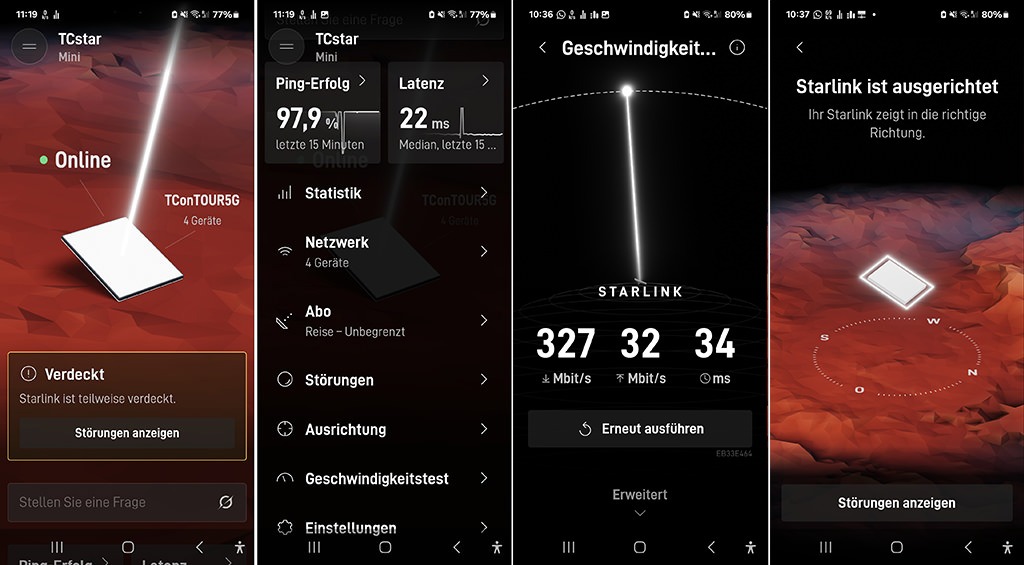
Once the light starts blinking instead of just glowing steadily, the Starlink dish begins searching for and connecting to the satellites. Depending on the location and sky visibility this usually only takes a few seconds or minutes.
To set up the system, you need either the Starlink mobile app or the desktop app. Both are quite similar, although the mobile app currently offers more functions and generally feels more practical during the initial setup process.
The Registration Process
Once the Starlink Mini is up and running and a satellite connection is established, you simply connect to the new Starlink Wi-Fi network, which can later be renamed and configured however you like.
The app then guides you through the activation process. You create a Starlink account, select a service plan and enter a registration address. This is where things can become slightly confusing for international travelers because availability, pricing and roaming options differ heavily between countries.
What we basically did was search for a country that offered the plan we wanted. At the moment the most relevant options for overlanders and long-term travelers are usually the Roam 100GB and Roam Unlimited plans. Finding a suitable tariff can take some time because prices vary massively between continents and countries. The USA for example is relatively expensive compared to many European countries, while Mongolia or some Central Asian “Stan” countries were surprisingly cheap at the time we checked.
However, this is also where the first potential trap appears. Even though Starlink registration often works globally, it is still smart to choose a registration country that makes practical sense for your actual travel route. Ideally the country should be on the same continent and preferably somewhere ahead of you during your planned journey.
The reason is simple: if Starlink ever decides to enforce regional rules more strictly and asks you to return to your registration country for whatever reason, life becomes much easier if that country is nearby.
For example, if you are traveling through South America and start in Patagonia, registering the system somewhere else in South America is relatively low risk, because border crossings are usually manageable. In Africa however, it would be rather impractical, if your device were registered in Europe, while you are currently somewhere in Ghana or Congo (nevertheless it is working w/o problems)
In most cases everything works perfectly fine and people never experience problems. Still, it is worth thinking ahead a little.
If you already know your approximate route, you could theoretically start your Africa trip in Morocco, but register the device somewhere farther south like Nigeria, if you know you will pass through there later anyway. Worst case, you may eventually need to physically enter that country at some point, which is still a lot easier than suddenly needing an intercontinental flight just because of a registration issue.
You do not need to use your real home address, but the address you enter, should actually exist!

Power Consumption – And How To Connect
The simplest solution is to use the included cable together with an inverter. The cable itself is 15 meters long, which allows you to place the dish farther away from the vehicle when camping under trees or with partially obstructed sky view.
However, powering the Starlink through 220V AC is relatively inefficient. In our case the system consumed roughly 5A per hour on the 12V side of the vehicle system, even though the dish itself only requires around 20W on average, which equals roughly 1.7A at 12V. The losses caused by converting 12V DC into 220V AC, combined with the inverter’s own power consumption, significantly increase the total energy usage.
So why not simply power the Starlink directly from 12V?
Well, this is where things become slightly tricky.
The Starlink Mini itself can technically operate with voltages between 12V and 40V, which sounds promising at first. Typical starter or leisure batteries usually provide somewhere between 12.5V and 14.8V depending on battery chemistry such as lead-acid, AGM, gel, LiFePO4 or LiFeYPO4.
In theory this should work perfectly fine. In reality however the Starlink dish reacts surprisingly sensitively to voltage fluctuations.
Our first attempts involved DIY cigarette lighter solutions. The dish would power on, then off again, randomly restart or suddenly shut down completely, despite measuring around 13.5V consistently.
After that we tried using a dedicated DC voltage converter which stabilized the output to a constant 12V. Again, this should theoretically have been enough for the Starlink Mini, but surprisingly it still did not work reliably.
After many failed experiments we finally decided to buy dedicated USB-C cables in both 3-meter and 10-meter lengths which allowed us to connect the dish directly to a portable power station, in our case a Bluetti EB70. (Attention: NOT EVERY advertised cable works, be careful and only buy good brands!)
The important detail here is, that the cable absolutely must support the PD3.0 / 100W standard.
(advertised 20V/5A cables might NOT work, as we experienced, esspecially when they are longer!)
Longer cables (> 3m) = more voltage fluctuation = weak power flow!
The thicker the cable, the longer it can be!
Since switching to this setup the Starlink Mini has been running completely stable while consuming only around 17W on average.
But hey: even at only 17–24W, the dish still consumes roughly 1.5–2A per hour continuously and that over many hours. That may not sound like much at first, but over an entire day (24 Amps in just 12 hours) and night, this quickly adds up to a noticeable amount of battery capacity – especially during bad weather or with limited solar input.

The Performance Of Starlink Mini
We almost never actively align the dish and still usually get between 100 and 190 Mbit/s, even under cloudy skies. Under optimal conditions with clear sky visibility and a naturally good vehicle orientation, we have seen speeds of up to 300 Mbit/s, which is honestly extremely fast for a mobile setup in remote areas.
In real-world usage, even 50 Mbit/s is already more than enough for basically everything including remote work, cloud uploads, streaming, navigation updates or large downloads.
Interestingly, heavy cloud coverage does not necessarily reduce the raw speed dramatically. The bigger issue is signal stability. Under dense clouds or partially obstructed skies the dish can occasionally lose satellite connection for a few seconds before reconnecting automatically. In practice this usually means short interruptions rather than permanently slow internet.
We also tested the system in not so dense forest conditions and I walked roughly 500 meters away from the vehicle. Even there we still achieved somewhere between 15 and 50 Mbit/s, which honestly surprised us quite a lot considering the amount of obstruction.
Overall we are genuinely impressed by the performance of the Starlink Mini. For overlanding and long-term travel it feels less like a compromise and more like having proper home internet almost everywhere.
But – as always – there is still one noticeable drawback: download speeds are excellent, but upload speeds are comparatively slow.
This is usually not a problem for normal browsing, streaming, navigation or downloading large files. But once you start uploading big amounts of data such as YouTube videos, RAW photos, cloud backups or large work projects, the limitation becomes very noticeable.
Downloads often feel almost like proper home fiber internet, while uploads can fluctuate heavily and sometimes require patience, especially in remote areas or under less ideal sky conditions. Video calls generally work fine, but professional content creators or people constantly syncing huge amounts of data should keep this limitation in mind.
The reason for this is relatively simple: satellite internet systems are generally optimized far more for download traffic than upload traffic because most users consume much more data than they send. Starlink shares available satellite bandwidth dynamically between many users and upload capacity is technically more limited.
This is completely normal for satellite-based systems and there is usually not much you can do to dramatically increase upload speeds themselves.
What does help however is optimizing the way data gets uploaded. Uploading several smaller FTP files simultaneously instead of one huge file can improve overall throughput. Resumable uploads are also highly recommended because short interruptions may otherwise force complete restarts. Compressing files before upload, scheduling large transfers during off-peak hours and avoiding cloud sync services running in the background at the same time can also noticeably improve real-world performance.

Starlink Mini is a Data monster
One thing still feels slightly strange though: the Starlink Mini seems to be a real data monster.
With a normal 50GB mobile SIM card we could often survive for nearly an entire month. With Starlink however the same amount of data somehow disappears in absolutely no time. We honestly cannot fully explain why. Maybe devices simply start using more bandwidth automatically once a fast and stable connection is available, maybe cloud services become more active, or maybe one simply stops paying attention because the internet finally feels unrestricted.
Whatever the reason is, data usage on Starlink feels dramatically higher compared to traditional mobile internet. Thankfully the newer Roam 100GB plan now exists, which makes things far more practical for long-term travelers – but more about that later.

Starlink Roam Plans – For The Traveler
Originally, Starlink mainly offered two realistically interesting roaming options for travelers and overlanders besides several other extremely expensive enterprise-style plans: Roam 50GB and Roam Unlimited.
The Roam 50GB plan was relatively affordable and worked well for light to moderate usage such as navigation, messaging, browsing, remote work and occasional streaming. For many travelers it became the entry point into the Starlink ecosystem because the monthly cost was still manageable compared to some absurd mobile data prices in remote regions.
The downside however was that 50GB disappeared surprisingly fast in real-world Starlink usage. Once you start using stable high-speed internet without constantly worrying about mobile coverage, data consumption increases almost automatically. System updates, cloud synchronization, streaming quality and background services suddenly become far more active.
On the other side there was Roam Unlimited. Technically this solved the data problem completely, but depending on the registration country, the pricing was often extremely high and not always realistic for long-term budget-conscious travelers.
This created a rather awkward gap between “not enough data” and “very expensive unlimited data.” Fortunately Starlink later introduced the Roam 100GB plan and as of May 2026 the 300GB plan, which for many overlanders currently feels like the best compromises between price and usability.
We personally use the Roam Unlimited plan because we regularly have to upload multiple terabytes of data every few months. For heavy content creation, large cloud backups or professional media work, limited plans simply stop being realistic very quickly.
But even here there are ways to reduce costs a bit. Although we normally pay around 89€ per month, we occasionally search for offers in other countries where Starlink runs temporary promotions. Sometimes the Unlimited plan is available for around 60–70€ for several months, depending on the country and current campaigns.
Referral programs can also help. Inviting new users occasionally rewards you with a free month of service. And interestingly enough, Starlink support sometimes even grants free service credits when users provide genuinely useful feedback or suggestions for improving the system. All of this has already happened to us personally.

Does Starlink Work In Every Country?
Yes, technically Starlink works in almost every single country as long as satellite coverage exists and the dish has a reasonably clear view of the sky. The satellites themselves obviously do not care about borders.
The main exception is geofencing or geoblocking. In some countries where Starlink has no official license, the service may be actively restricted either by local authorities or directly by Starlink itself. In such cases the dish may not be able to establish a satellite connection at all, even though satellites are physically overhead.
The real challenge is therefore usually not the technical functionality itself, but regulations, licensing and Starlink’s own regional restrictions. Some countries officially support Starlink, some unofficially tolerate it and others restrict or completely prohibit its operation. In certain regions the hardware may work perfectly fine for months until rules suddenly change or enforcement becomes stricter.
We ourselves successfully used Starlink in technically unsupported countries such as South Africa and Tanzania for quite some time without any issues, until Starlink eventually cut off the signal. But we will discuss this topic in more detail later on.
In practice many travelers still use Starlink across borders without major problems, especially with roaming plans. Nevertheless it is important to understand that “technically possible” and “officially supported” are not always the same thing.
That said, Starlink is generally surprisingly tolerant and forgiving compared to what the official wording in their policies might suggest.

2 Months on the road – and then?
Traveling to another country
You can use your Roam plan in most available countries for up to 60 days per trip.
Check which countries are available on our availability map.
Staying Longer Than Two Months
If you plan to remain in another country for more than two months:
- You may need to update your registered address.
- You may be asked to transfer your account to that country.
- If you do not transfer, your service may be restricted.
- If restricted, you will only be able to access your Starlink account.
(source: Starlink Terms and Conditions)
This is, what Starlink officially says, but did you notice all the “mays”?
Here theory turns into reality. “May” means something can happen, but it does not necessarily have to happen and very often it simply does not.
Even we repeatedly received generic warning messages telling us to leave the country and return to the original registration country. However, a quick call with the support usually solved the issue.
Once we explained that we are long-term travelers and simply cannot fly back home every time, we cross a border, Starlink re-enabled the service again.
So far the Starlink support has generally been surprisingly understanding. We were usually warned that the system might become restricted again in the future, but nevertheless they restored the connection every single time.
In the unlikely event that Starlink actually insists that you return to your original registration country, simply cancel the subscription. Make sure to note down all important device and account information beforehand, delete the account and create a new one afterward.
Starlink generally will be completely fine with this approach – but more about that later.

Terms & Conditions, Restrictions, Regulations, Do’s and Don’ts and “Mays”
One thing quickly becomes obvious when using Starlink internationally for long-term travel: the rules constantly change. Terms and conditions get updated all the time – sometimes monthly, sometimes weekly and occasionally it even feels like daily.
The problem is not only the frequency of these changes, but also the wording itself. The documents are already confusing and often surprisingly open to interpretation. One paragraph says something “may” happen, another warns that certain behavior “could” lead to restrictions, followed by exceptions, special cases, regional limitations and vague “however” statements.
Very little feels truly black and white.
In reality this creates situations that often make very little sense from the user perspective. Sometimes Starlink gets restricted even though you have not yet spent two months outside your registration country. Sometimes the reason is completely unclear. Sometimes the system suddenly starts working again without any warning or explanation.
Then you try to follow all the rules properly by changing countries every two months, only for the system to get restricted again anyway. Other users ignore the rules almost completely and continue working for months without any issues at all.
This is exactly why many travelers slowly stop treating the Starlink documentation as strict law and instead see it more as a constantly shifting framework that may or may not be enforced depending on country, timing, support staff or pure luck.
At the end of the day, do yourself a favor: do not waste endless hours trying to fully understand every single paragraph of the Terms & Conditions. In many cases even experienced users interpret them differently anyway.
If something stops working or feels unclear, simply contact support immediately. In practice this is often faster, less frustrating and far more useful than trying to decode another wall of “may”, “could”, “however” and “subject to change without notice”.
You will notice that in many cases the problem gets solved much faster than expected. So yes – surprisingly enough – kudos to Starlink support. cough😉

The Starlink Support – is it any good?
It depends.
The first contact is usually the AI support system and honestly: Grok often hallucinates, provides half-true or outright incorrect information and regularly gets trapped in contradictions. Sometimes it simply repeats generic policy text that does not really apply to your actual situation.
The best strategy is usually to persistently push the AI toward creating a real support ticket so you can speak to an actual human. Do not let yourself get brushed off too quickly. Eventually the system usually creates the ticket and a human supporter gets in touch.
And this is where things often become much better.
By now Starlink support seems very aware that there are quite a few long-term travelers, overlanders and digital nomads using the system internationally, who cannot simply fly back to their home country every time a restriction appears.
In some situations, especially if the system becomes permanently blocked and support cannot directly re-enable it anymore, they may suggest simply deleting the account and creating a new one. The account name can stay identical, but the email address must be different. Surprisingly, Starlink seems completely fine with this workaround.
You are a paying customer, generating monthly revenue for Starlink
In general, being friendly and explaining your situation calmly usually helps a lot. We even experienced cases where Starlink was technically being used inside unsupported countries and support still ended up being rather understanding about it.
Unofficially it sometimes almost feels like the advice is: do not abuse the system, stay relatively low-profile and do not use unsupported regions excessively or commercially. If you behave reasonably, support often seems willing to give travelers another chance and reactivate the service.
Of course none of this is officially guaranteed and policies can change at any time. But in real-world travel situations the human support team often turns out to be far more pragmatic than the Terms & Conditions initially suggest.
At the end of the day, you are still paying customers, generating monthly revenue for Starlink. That does not mean every restriction magically disappears, but it often feels like the company prefers finding pragmatic solutions, instead of permanently losing long-term users over purely bureaucratic problems.
Accounts & Subscriptions – When to cancel and when to pause?
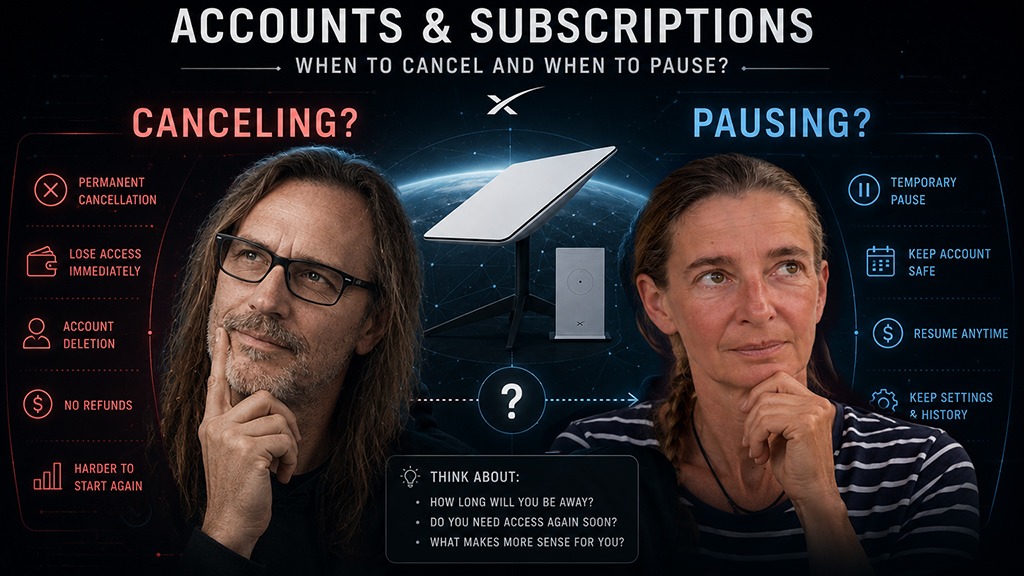
If you only do not need Starlink for a couple of days or weeks, pausing the subscription might usually be the smarter option. The same applies when entering a country, where Starlink is currently unsupported or temporarily problematic. In many cases it simply makes more sense, to keep the account alive and wait things out instead of rebuilding everything from scratch later.
The nice thing is, that pausing currently only costs around 5 USD per month and still provides unlimited internet access, although at heavily reduced speeds. According to Starlink and various user reports, speeds are supposed to be somewhere around 500 kbit/s. Obviously this is far from fast, but still perfectly usable for messaging, emails, lightweight browsing or emergency communication. But hey… if it works? I do not know – never tried it.
Pausing can also be useful if a specific roaming plan suddenly becomes unavailable for your account or region. Starlink changes tariffs, country availability and roaming rules surprisingly often, so sometimes holding onto an existing setup is simply the safer strategy.
Canceling on the other hand, often becomes relevant once real account problems start appearing. For example when the account gets regionally blocked, permanently restricted or stuck in some strange registration limbo that support cannot easily resolve anymore. In such cases deleting the account and creating a completely new one can occasionally be the fastest and cleanest solution.
The funny thing is: even after using Starlink for a long time, I still cannot say with absolute certainty, which option is always the correct one. Welcome to the wonderful world of Starlink logic.
Let me know if you have more detailed information or real-world experience regarding this feature.

Switching to a new Starlink Account – How to and what to not forget
When shit hits the fan and absolutely nothing works anymore, your system gets permanently blocked and Starlink insists that you return to your home country, do not panic immediately. According to recommendations we personally received from human Starlink support, the smartest moment to handle the process is shortly before the next billing cycle begins (1 week prior to the cycle end).
Before doing anything else, make absolutely sure to note down your Starlink ID, Kit ID and serial number (see picture above). You can find all of these at the very bottom of your subscription/account page. Without this information the entire transfer process can become unnecessarily complicated later on.
After that you need to cancel the subscription and initiate a hardware transfer. However, this is where many people suddenly run into confusion because the “Transfer” button may remain greyed out or completely inactive.
The reason is Starlink’s internal transfer policy.
According to Starlink, the service must first be canceled before it can be transferred, and this is only possible at least 120 days after purchasing the kit or 90 days after activation.
Until this requirement is fulfilled, the transfer option simply remains unavailable or greyed out.
This means you cannot endlessly create fresh accounts every couple of weeks and constantly move the hardware around between profiles. Starlink intentionally limits this behavior.
Once the transfer finally becomes available, you can release the hardware from the old account and register it again under a completely new account. The name itself can remain identical, but the email address must be different. This part is important.
In practice the reactivation process is often surprisingly straightforward. Create the new account, select the desired country and roaming plan, enter the hardware details and activate the system again. In many cases the dish comes back online within minutes (we did that several times)
Still, this process is obviously not something you want to repeat regularly. It is more of an emergency reset button for situations where roaming restrictions, regional locks or account problems become impossible to solve otherwise.
Even without a SIM card, Starlink provides a temporary internet connection that allows you to set up the system and activate a subscription.
Which plan is the right one for me?
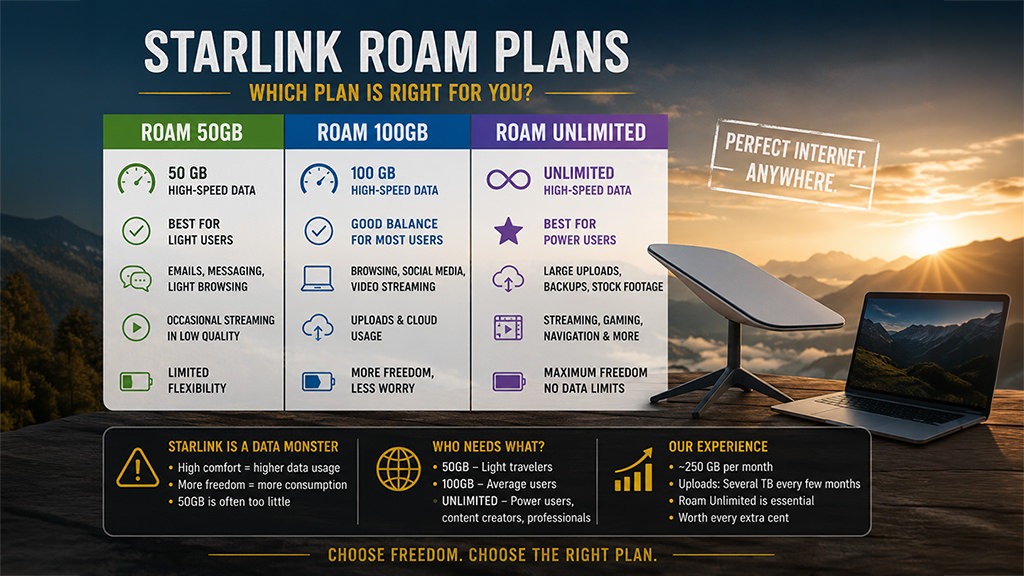
Let us mainly talk about the standard Roam plans here, because realistically most of the other plans are either far too expensive, too specialized or simply not relevant for normal overlanders, vanlifers and long-term travelers. For most people the real choice comes down to Roam 50GB/100GB/300GB or Roam Unlimited (availability depends on country).
As already mentioned earlier, Starlink somehow behaves like a real data monster. We personally use significantly more data with Starlink than we ever did with normal mobile SIM cards. At first we assumed 50GB would probably be enough, but after testing our real-world usage it quickly became obvious that it was nowhere near sufficient for us.
A completely normal day with Starlink for us looks something like this: regular browsing, checking emails, quickly looking at YouTube to see what is new, maybe watching a video, writing Polarsteps and Facebook posts including photos, editing pictures, retrieving GPS and satellite map information online, handling administrative and logistical tasks and navigating during driving with satellite view permanently enabled. In the evening we usually stream a movie and finish the day with a little bit of doomscrolling.
Our average monthly usage ended up being around 250GB. Interestingly, with normal SIM cards we previously managed with roughly 150GB for almost the same lifestyle. Something about Starlink simply encourages heavier data usage once fast and stable internet becomes constantly available.
For us the 50GB plan was completely unrealistic.
On top of that, I also make money with stock footage and every few months I upload large amounts of material to my server in Germany. These uploads can easily grow into several terabytes, making Roam Unlimited absolutely essential in our case.
We talked to other travelers who genuinely use very little internet and still managed fine with 50GB plan, but most people we met eventually switched either to the 100GB plan or directly to Unlimited.
For us personally Unlimited is definitely worth the additional cost. The extra freedom, reduced stress and ability to simply use the internet without constantly monitoring every gigabyte is a massive improvement during long-term travel.

Our Conclusion on Starlink
For us, Starlink has been an absolute game changer.
Again and again we caught ourselves choosing our campsites based on mobile phone towers. Truly remote areas were usually only visited when there were people nearby or when we spotted a transmission tower somewhere in the distance. More than once I even launched the drone with a smartphone attached to it just to catch a weak signal somewhere above the trees.
Today all of this is gone. We no longer have to deal with buying overpriced SIM cards, signing contracts, registering passports or struggling with ridiculous data limits and unstable connections.
We simply drive where we actually want to go. Deeper into the wilderness, further away from civilization and into places we would previously have avoided because we worried about communication and emergency access.
And honestly, we noticed how much this changed us mentally as well. We became calmer and more relaxed.
Sure, there are travelers who are perfectly happy without internet. WE ARE NOT.
We want to be online anytime and anywhere
– especially because we are often traveling completely alone.
The internet is our connection to the world, to friends, familiar faces and our families.
And Starlink opens that gate almost everywhere.
Last update: 16.05.2026
RECENT UPDATES
July 2026: Major Changes to Starlink Roam
Starlink has announced a major update to its international roaming policy. New customers signing up on or after July 14, 2026 are immediately subject to the new rules, while existing customers will transition on August 17, 2026.
The biggest change is that Roam Unlimited now only allows 30 consecutive days outside your registered home country. After that, you must either return to your home country (or home region in Europe), transfer your account to the new country, or upgrade to a Priority plan.
Even more restrictive, all other Roam plans (50GB, 100GB, etc.) are now intended for use only within your registered home country or home region. For European users, however, all participating European countries are treated as one region, meaning travel within Europe does not count as international roaming.
For long-term overlanders and world travelers, these changes are significant and could fundamentally change how Starlink Roam can be used outside your home region. We will update this guide as soon as we gain real-world experience with the new policy.
Reas the changes here: Travel with Starlink Roam – Starlink-Help Center (ge)
But there’s Good News for Long-Term Travelers
Following the announcement of Starlink’s new international roaming policy, we contacted Starlink support directly, to clarify how the new rules affect long-term overlanders.
According to Starlink, travelers spending several months in each country do not need a Priority plan. Instead, you can use Roam Unlimited for the first 30 days, then simply transfer your account to the country you are currently visiting. As long as your Starlink kit is at least 120 days old or your service has been active for more than 90 days, no proof of residence is required. This process can then be repeated for every new country you enter.
The only additional requirement is Travel Registration, which must be completed in your Starlink account before traveling internationally.
If this policy is implemented as described, it is excellent news for long-term travelers and overlanders, as it removes the need for the significantly more expensive Priority plans. We will, of course, test this ourselves and report back with real-world experience.
May 2026: New Roam 300GB Plan & Price Changes
Starlink introduced the new Roam 300GB plan in the United States. Current US pricing is roughly:
- Roam 100GB → 55 USD
- Roam 300GB → 80 USD
- Roam Unlimited → 175 USD
At the same time pricing also changed in other regions. In Germany for example, Roam Unlimited increased to around 95€ per month.
However, the new 300GB plan is currently still unavailable in Germany and several other countries. As usual with Starlink, pricing structures, roaming plans and availability differ heavily depending on the registration country and may change at any time.
last updated: 21.05.2026
FAQ - Frequently Asked Questions
Did Starlink ever cut off your signal?
Yes – more than once. And especially in the beginning, we honestly panicked every single time it happened.
Sometimes the signal was cut after only two weeks inside a country. Sometimes it happened in technically unsupported or unlicensed countries. And occasionally it simply seemed to be caused by some random technical issue.
The frustrating part was that the error messages were often identical, no matter what the actual reason was. So in many situations we never really knew whether the problem was geoblocking, roaming restrictions, account issues or simply a temporary system error.
In the end however, the exact reason often did not even matter that much. A short conversation with human support usually solved the problem surprisingly quickly and the system was reactivated again.
Does Starlink really work everywhere?
Yes. Honestly – yes.
As long as satellites are overhead and the dish has at least some visibility to the sky, Starlink works surprisingly well almost everywhere. We used it in deserts, remote wilderness, mountains and places where normal mobile networks completely stopped existing long ago.
And yes — this even includes many technically unsupported or “forbidden” countries which currently do not actively enforce geoblocking. However, you use Starlink there entirely at your own risk. Things may work perfectly fine for weeks or months until the system suddenly gets restricted or disconnected.
The main exceptions are geoblocking or geofencing in countries where Starlink is restricted or unsupported. In such cases the system may suddenly stop working entirely, even though satellites are physically overhead.
A heavily obstructed sky can also become a problem. Dense tree cover, steep cliffs or very thick cloud layers may interrupt the connection or delay satellite acquisition. Interestingly however, even under difficult conditions the system often still reconnects from time to time once a satellite briefly becomes visible. Sometimes this only takes seconds, sometimes minutes and occasionally even hours.
This is also why having a small backup SIM card with at least some mobile data still makes sense. Apart from emergency situations, mobile internet is often simply more practical in places like supermarkets, fuel stations or cities where setting up the dish would be inconvenient anyway.
Trees are another surprisingly important factor. By now we automatically park in a way that still leaves at least a small opening toward the sky. Even a relatively tiny gap between branches can already be enough for Starlink to maintain a stable connection.
And honestly, there is still something slightly surreal and fascinating about being online in the middle of absolute nowhere, deep inside a desert or remote wilderness, hundreds of kilometers away from civilization.
Did you ever experience hardware failures?
Rarely, but yes.
One issue we experienced was overheating when we forgot to open the roof hatch properly. In that case the Starlink Mini became too hot and displayed an overheating warning message. Opening the hatch and improving airflow solved the problem every single time.
Another common issue is unstable 12V power supply. Starlink reacts extremely sensitively to voltage fluctuations. With unstable power the dish may repeatedly boot up, shut down again or randomly switch itself off.
This thing definitely needs power – enough of it, but more importantly: stable power.
Other than that, we honestly did not experience any major hardware problems so far.
Do you use 2.4 GHz or 5 GHz Wi-Fi connection?
Both, mainly because we still use some devices that simply do not support 5 GHz Wi-Fi.
However, most of the time we use the 5 GHz connection, because it is way faster than the 2.4 GHz variant. Downloads, uploads and general responsiveness are simply much better.
The downside is, that 5 GHz usually has slightly shorter range and performs worse through obstacles like walls or dense vegetation. In practice however this rarely matters for us since we are mostly close to the vehicle anyway.
Can the dish be used as a router?
Yes. The Starlink Mini already includes its own integrated Wi-Fi router, so in most situations you do not need any additional networking hardware. Simply power it on and connect your devices directly to the Starlink Wi-Fi network.
For normal travel usage this works perfectly fine and easily covers a campervan or nearby campsite area.
However, if you need more advanced networking features, longer Wi-Fi range, external antennas, VPN setups or mesh systems, you can also connect Starlink to a separate external router. Many overlanders and digital nomads eventually do this to build more stable or more powerful onboard networks.
Is the upload speed with Starlink really that bad?
Unfortunately, I have to say: yes. The upload speed just sucks.
Even though the theoretical upload speed shown by Starlink is often somewhere between 30–50 Mbit/s, the real-world upload speed mostly drops down to only around 350 KB/s, which feels painfully slow nowadays.
I researched this topic quite a lot and apparently this behavior is not unusual. According to ChatGPT and various technical explanations, Starlink prioritizes download traffic much more heavily than upload traffic, because the vast majority of users consume far more data than they upload. Upload bandwidth is shared dynamically and can fluctuate significantly depending on satellite coverage, network congestion, routing and the destination server itself.
We also noticed something interesting: uploads to huge cloud infrastructures like Google, YouTube or other major providers are often surprisingly fast. But uploading files to my own server in Germany, despite it running on fiber internet, usually slows down dramatically and often stays around the already mentioned 350 KB/s.
This is where tools like FileZilla become extremely useful. Instead of uploading one large file, I start several simultaneous uploads in parallel. Doing this often increases the total throughput massively and I can sometimes reach around 10 MB/s overall, which is a huge difference.
Nevertheless, uploading multiple terabytes of footage still requires a lot of patience with Starlink. There is really no sugarcoating that part.
Can you use Starlink while driving?
Yes – absolutely. For us this is completely normal daily usage.
The Starlink Mini is designed to work while moving and in our experience it does this really well. We honestly do not know the exact maximum speed limit, at which the system still functions reliably, but during normal overlanding travel we never had any serious problems.
We usually drive somewhere around 80 km/h, but even at 100 km/h we never experienced connection dropouts or major interruptions. Navigation, streaming, browsing and background uploads continued working without noticeable issues while driving.
Of course terrain, sky visibility and obstructions still matter, but generally speaking the system handles mobile usage far better than we initially expected.
How far away from the van does Starlink still work?
We actually tested this inside a forest, although not an extremely dense one. At roughly 500 meters distance with mostly clear line of sight to the vehicle, I still had around 15 Mbit/s connection speed. Honestly, that surprised us quite a lot.
Doesn’t all the shaking while driving cause problems?
Honestly, I thought exactly the same in the beginning. But the build quality of the Starlink Mini is surprisingly good.
So far every corrugated road, gravel track, pothole road and rough offroad section we have driven, caused absolutely no problems for the system. The dish seems far more robust than initially thought.
The only thing we still cannot fully judge yet, is long-term exposure to permanent extreme sunlight and heat over multiple years. Time will tell how well the materials hold up under constant UV radiation and high temperatures.
But so far? Honestly: everything has been excellent.
Does Starlink work across continents?
Yes – at least according to what I heard and experienced so far.
Our own system for example is registered in Spain while we are currently traveling through Africa without major issues. So intercontinental usage itself is definitely possible.
What we honestly do not know yet is, what happens once we physically move the hardware to a completely different continent outside the current roaming region. That is something we will soon find out ourselves during further travels.
Any other issues with Starlink?
I am not even sure whether this really counts as an actual issue, but we definitely noticed that we need a VPN much more often than we originally expected.
Sometimes websites suddenly become unreachable. Sometimes you get blocked entirely or constantly have to solve CAPTCHA challenges. In other situations certain country-specific websites stop working properly, while at other times even your own server may reject the connection because the access suddenly appears as “unknown” or suspicious.
There are regularly situations where enabling a VPN suddenly fixes everything – and other situations where the exact opposite is true and the VPN actually causes the problem.
I assume this mostly happens because Starlink routes traffic dynamically through different gateways and countries, which can occasionally confuse security systems, geo-restrictions or automated fraud detection mechanisms.
Yes, it can become slightly annoying at times, but honestly: for us this is nowhere near a real red flag. It is more one of those small quirks you simply learn to live with after a while.
Last updated: 20.072026